
Function Outline
In the Subaru Solterra, Traffic Jam Assist is an advanced driver support feature designed to reduce fatigue during congested driving conditions. After confirming operating conditions, the system can assist with lane centering, controlled acceleration and deceleration, as well as stopping and restarting in slow-moving traffic on selected highways and expressways.
Additionally, in critical situations, the Subaru Solterra Traffic Jam Assist system can automatically reduce speed and bring the vehicle to a stop to help prevent a collision or lessen its severity.
Sensors that support the Traffic Jam Assist
- Sensors which detect the surrounding conditions
- Sensors which detect the driver condition
Traffic Jam Assist Function
The Subaru Solterra Traffic Jam Assist feature integrates multiple systems to provide steering support, speed control, and stop-and-go capability in traffic congestion scenarios.
This function becomes available only when all specified operating conditions are satisfied. While active, the Subaru Solterra allows hands-off steering for limited periods, enhancing convenience in slow traffic conditions.
Before activating this feature, it is essential to understand how Dynamic Radar Cruise Control and LTA (Lane Tracing Assist) operate, as they form the foundation of the Subaru Solterra Traffic Jam Assist system.
The driver must always take control when exiting highways, entering service or parking areas, approaching toll booths, or performing lane changes.
Driver monitor camera recording
When the Traffic Jam Assist function is initiated in the Subaru Solterra, a confirmation message will appear:
- "Allow Driver Monitor Camera Recording?"
If permission is granted, the Subaru Solterra may record images of the driver’s surroundings in certain emergency or near-collision situations, such as airbag deployment or impact with an obstacle.
WARNING
■ For safe use
- The driver of the Subaru Solterra is always responsible for maintaining full control and awareness. This system is designed to assist, not replace attentive driving.
- The Subaru Solterra Traffic Jam Assist is not an autonomous driving system.
It provides assistance based on road layout, traffic flow, and driver condition, but the driver must continuously monitor surroundings and remain ready to intervene.
- Depending on environmental conditions, traffic complexity, or driver
state, the system may not activate or may temporarily suspend operation.
Performance may vary, and the Subaru Solterra driver must not rely solely on this feature.
- The steering support in the Subaru Solterra is optimized for minor corrections
in slow-moving traffic. It is not intended for aggressive steering or emergency
maneuvers.
While Traffic Jam Assist is active, certain lane departure prevention features may be limited, and the driver must remain engaged.
- Even when functioning correctly, the Subaru Solterra system may interpret surroundings differently than the driver. Continuous attention and risk assessment are essential to safe driving.
- The driver must maintain clear visibility at all times, as manual intervention may be required immediately.
- If a warning prompts the driver to hold the steering wheel, the Subaru Solterra driver must immediately resume manual control to maintain safety.
- The Subaru Solterra Traffic Jam Assist system cannot detect certain hazards.
The driver must operate the steering wheel, accelerator, or brake as needed
to avoid danger.
- Objects located directly on the road surface
- Vehicles positioned outside the driving lane, such as on shoulders
- Potholes, cracks, or road surface damage
- Construction zones and temporary road changes
- Vehicles driving parallel nearby or close roadside structures
- Animals or unexpected moving obstacles
The Subaru Solterra Traffic Jam Assist system enhances comfort during congested driving conditions, but it must always be used responsibly as a support tool alongside active driver awareness and control.
■ Situations in which Traffic Jam Assist Function should not be used
In the Subaru Solterra, avoid using the Traffic Jam Assist function under the following conditions, as the system may not be able to provide reliable control. Improper use could increase the risk of an accident that may result in serious injury or damage.
- When system deactivation is required due to safety or environmental conditions
- When sensors of the Subaru Solterra may not function correctly due to contamination, obstruction, or damage
- When lane markings or road boundaries cannot be clearly detected by the system
■ Situations in which the function may not operate properly
The Subaru Solterra Traffic Jam Assist system may behave unpredictably or fail to operate correctly in the following scenarios. The driver must take full control of the vehicle when these conditions occur.
- When sensors are affected by water, mud, or debris
- When operating in extremely high or low ambient temperatures
- When another vehicle abruptly cuts in front of the Subaru Solterra
- When lanes merge or split in the direction of travel
- When visibility is significantly reduced due to weather or lighting conditions
- When the Subaru Solterra experiences body movement such as pitching or rolling
- When road traction differs significantly between left and right wheels
- When driving on expressways without clear median separation or with temporary lane dividers
- When there is a large speed difference between the Subaru Solterra and surrounding vehicles
- When navigation or map data used by the Subaru Solterra system is outdated or inaccurate
■ Operating conditions of the function
The Subaru Solterra Traffic Jam Assist function becomes available only when all of the following requirements are satisfied:
- The system successfully detects lane markings as well as the movement of preceding or nearby vehicles
- Dynamic Radar Cruise Control and Lane Tracing Assist are both active
- The turn signal lever is not in use
- The Subaru Solterra is not navigating sharp or aggressive curves
- The vehicle is positioned properly within the center of the lane
- The driver monitoring system confirms that the driver is facing forward
- The Subaru Solterra is traveling in congested highway traffic at approximately 25 mph (40 km/h) or less (in some cases, activation may occur at speeds around 20 mph [30 km/h] or lower)
- For vehicles equipped with connected navigation, an active Safety Connect subscription is required
- The driver’s door is fully closed
- The driver’s seat belt is securely fastened
- The Traffic Jam Assist feature is enabled in the Subaru Solterra customization settings
- All related system components are functioning normally
- The Pre-Collision System (PCS) is enabled in the settings
- The extended restart timing function for Dynamic Radar Cruise Control is active
The Subaru Solterra Traffic Jam Assist system is highly advanced, but its performance depends on proper operating conditions. For maximum safety, the driver must always remain attentive and ready to intervene whenever necessary.
■ Temporary cancelation of the function
- In the Subaru Solterra, if any required operating condition is no longer satisfied, the Traffic Jam Assist function may be temporarily suspended. Once all conditions are restored, the system will automatically resume operation without requiring additional input from the driver.
- If the Subaru Solterra detects that conditions have changed while the system
is active, a warning message and audible alert may appear to inform the driver
that the function has been paused. If the driver does not respond to these alerts,
the driver emergency stop assist system may be triggered.
Refer to the relevant display messages and instructions shown on the Subaru Solterra instrument panel for appropriate actions.
■ Driving operations during controlled driving
- Accelerator pedal
In the Subaru Solterra, the driver can accelerate normally by pressing the accelerator pedal. However, when traveling at approximately 6 mph (10 km/h) or higher, pressing the accelerator will disengage the Traffic Jam Assist function.
- Brake pedal
Braking can be performed as usual in the Subaru Solterra by pressing the brake pedal. This action will immediately cancel the system’s controlled driving assistance.
- Steering wheel
The steering wheel of the Subaru Solterra can always be operated manually. If the steering input exceeds a certain threshold, the Traffic Jam Assist function will automatically deactivate, returning full control to the driver.
■ When a warning message is displayed
- ●"Traffic Jam Asst System Malfunction Visit Your Dealer"
This message indicates that the Subaru Solterra Traffic Jam Assist system may not be functioning correctly and requires inspection by an authorized service center.
- "Traffic Jam Asst Unavailable Stop Assist Activated"
This notification means that the Subaru Solterra system is temporarily unavailable because the driver emergency stop assist function has been activated.
Changing Traffic Jam Assist settings
- The Subaru Solterra Traffic Jam Assist feature can be turned on or off through the vehicle’s customization settings menu.
- The recording function of the driver monitor camera in the Subaru Solterra can also be enabled or disabled according to driver preference.
Displays and system operation
The Subaru Solterra provides clear visual indicators to display the current operational status of the Traffic Jam Assist system, helping the driver understand when assistance is active, paused, or unavailable.
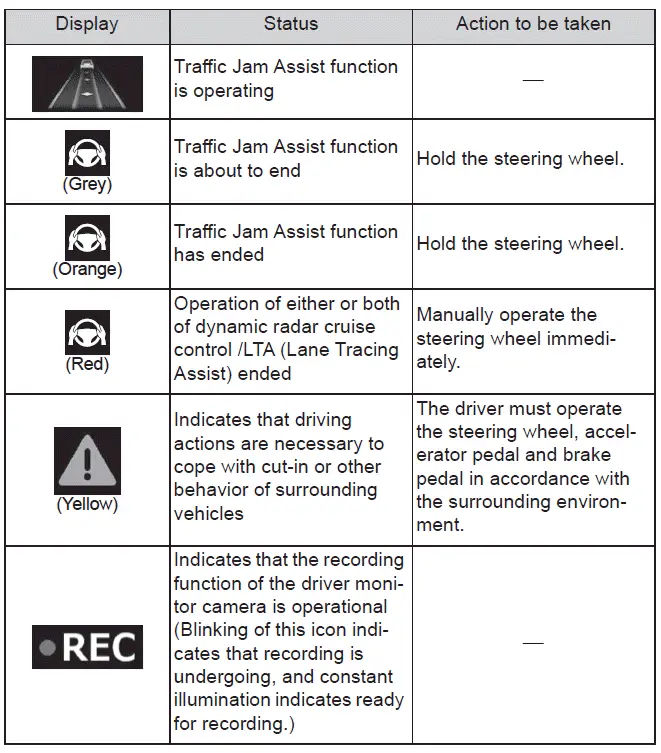
The Subaru Solterra Traffic Jam Assist system is designed to enhance comfort and safety in congested traffic conditions, but the driver must remain attentive and ready to take control at any moment.