
In the Subaru Solterra, a wide range of vehicle operations can be performed effortlessly simply by carrying the electronic key on your person, such as in a pocket or bag. For optimal functionality and security, the driver should always keep the electronic key within reach.
- Locking and unlocking all doors of the Subaru Solterra
- Locking and unlocking the back door
- Starting the EV system without inserting a physical key
The Subaru Solterra smart key system enhances convenience by eliminating the need for manual key operation, allowing seamless interaction with the vehicle.
■ Antenna location
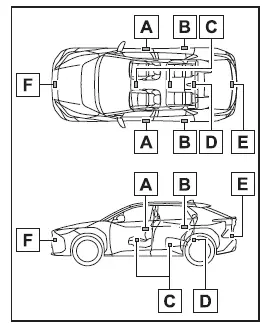
- Antennas located outside the Subaru Solterra cabin (front area)
- Antennas located outside the Subaru Solterra cabin (rear area) (if equipped)
- Interior cabin antennas
- Antennas within the luggage compartment
- Antenna positioned outside the luggage compartment
- Additional exterior antennas (vehicles equipped with Advanced Park remote control function)
These strategically placed antennas allow the Subaru Solterra to detect the electronic key accurately and respond to driver input in real time.
■ Effective range (areas within which the electronic key is detected)
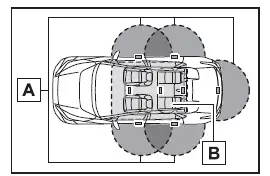
- When locking or unlocking the doors
The Subaru Solterra smart key system operates when the electronic key is within approximately 2.3 ft. (0.7 m) of the front door handles, rear door handles (if equipped), or the back door opener switch. Only the doors detecting the key will respond.
- When starting the EV system or switching power modes
The system functions when the electronic key is located inside the Subaru Solterra cabin.
■ If an alarm sounds or a warning message is displayed
The Subaru Solterra uses audible alerts and on-screen messages to notify the driver of incorrect operations, potential risks, or security concerns. These alerts help prevent accidental misuse or theft.
When a warning message appears, follow the instructions shown on the display to resolve the issue.
If only an alarm is heard, the situation can typically be identified as follows:
- When an exterior alarm sounds once for approximately 5 seconds
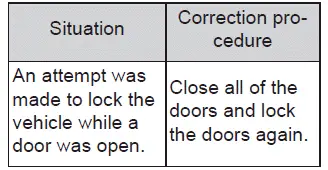
- When an interior alarm sounds continuously
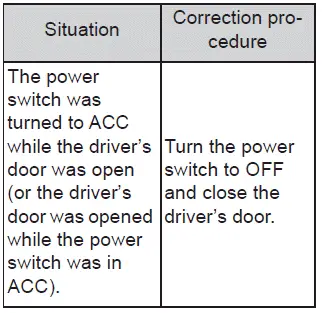
■ Battery-saving function
To preserve both the Subaru Solterra electronic key battery and the vehicle’s 12-volt battery during extended periods of inactivity, a battery-saving mode is automatically engaged.
- In the following cases, unlocking the Subaru Solterra doors may take longer
than usual:
- If the electronic key remains within approximately 11.5 ft. (3.5 m) of the vehicle for more than 2 minutes
- If the smart key system has not been used for 5 days or longer
- If the Subaru Solterra smart key system has not been used for 14 days or
more, only the driver’s door can be unlocked using the entry function.
In this situation, grasp the driver’s door handle or use the wireless remote control or mechanical key to unlock the vehicle.
■ Turning an electronic key to battery-saving mode
- Activating battery-saving mode in the Subaru Solterra reduces energy consumption by stopping the electronic key from receiving radio signals.
Press
 twice while pressing and holding
 .
.
Verify that the electronic key indicator flashes four times, confirming that the Subaru Solterra has entered battery-saving mode.
While this mode is active, the smart key system functions will be disabled. To exit battery-saving mode, press any button on the electronic key.
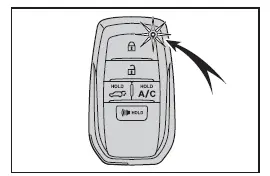
- For long-term storage, it is recommended to enable battery-saving mode for Subaru Solterra electronic keys that will not be used for extended periods.
■ Conditions affecting operation
The Subaru Solterra smart key system operates using low-power radio signals. Under certain environmental or usage conditions, communication between the electronic key and the Subaru Solterra may be disrupted, which can affect the proper functioning of the smart key system, wireless remote control, and immobilizer system.
- When the electronic key battery of the Subaru Solterra is weak or fully depleted
- When the vehicle is located near facilities that generate strong electromagnetic interference, such as TV towers, power plants, gas stations, radio transmitters, large digital displays, or airports
- When the electronic key is in direct contact with or shielded by metallic
objects, including:
- Cards containing aluminum layers
- Metal wallets or bags
- Loose coins
- Metal-based hand warmers
- Optical media such as CDs or DVDs
- When another wireless key device is operating nearby
- When carrying the Subaru Solterra electronic key together with devices emitting
radio waves, such as:
- Mobile phones, cordless phones, or portable radios
- Other electronic keys or wireless transmitters
- Laptops or handheld digital devices
- Portable audio players
- Handheld gaming systems
- When metallic window tint or metal objects are attached to the rear glass
- When the electronic key is placed close to chargers or electronic equipment
- When the Subaru Solterra is parked in automated or paid parking facilities where radio signals are actively transmitted
These conditions may temporarily reduce the responsiveness of the Subaru Solterra smart key system or prevent it from functioning as expected.
■ Note for the entry function
- Even when the Subaru Solterra electronic key is within the detection range,
the system may not respond correctly in the following situations:
- If the key is positioned extremely close to the door window or handle, placed near the ground, or located at a higher elevation during locking/unlocking
- If the key is left on the dashboard, inside the luggage compartment cover area, on the floor, or stored in door pockets or the glove compartment when starting the EV system
- Do not leave the electronic key inside the Subaru Solterra near the instrument panel or door pockets when exiting. Depending on signal reception, the key may still be detected outside, allowing the doors to lock and potentially trapping the key inside the vehicle.
- As long as the electronic key remains within range, the Subaru Solterra doors can be locked or unlocked by anyone. However, only the door that detects the key will respond.
- In some cases, even if the key is outside the Subaru Solterra, the EV system may still start if the key is located close to a window.
- If water splashes onto the door handle—such as during rainfall or a car
wash—while the electronic key is within range, the doors of the Subaru Solterra
may repeatedly lock and unlock.
(If no door is opened within approximately 60 seconds, the system will automatically relock the doors.)
- If the wireless remote control is used to lock the Subaru Solterra while the electronic key is nearby, the entry function may not unlock the doors. In such cases, use the remote control to unlock them.
- Wearing gloves may reduce sensitivity when touching the lock sensor. Remove gloves and try again for proper Subaru Solterra operation.
- Recognition signals for lock operations may only be displayed up to two consecutive times. After that, no further confirmation signals may be shown.
- If the door handle becomes wet while the Subaru Solterra electronic key
is nearby, repeated locking/unlocking may occur. To avoid this during washing:
- Keep the electronic key at least 6 ft. (2 m) away from the Subaru Solterra
- Activate battery-saving mode to temporarily disable the smart key system
- If the electronic key is inside the Subaru Solterra during a car wash and the handle becomes wet, a message may appear on the display and an external buzzer may sound as a warning.
To deactivate the alarm system in the Subaru Solterra, securely lock all doors using the smart key system or remote control.
■ When the vehicle is not driven for extended periods
- To reduce the risk of theft, do not leave the Subaru Solterra electronic key within approximately 6 ft. (2 m) of the vehicle when it is parked.
- The smart key system of the Subaru Solterra can be deactivated in advance for additional security.
- Enabling battery-saving mode on the Subaru Solterra electronic key helps reduce unnecessary power consumption during long-term storage.
■ To operate the system properly
For correct operation of the Subaru Solterra smart key system, always carry the electronic key with you. Avoid holding the key too close to the vehicle exterior when attempting to operate the system from outside.
Depending on how and where the electronic key is held, the Subaru Solterra may not detect it accurately, which could result in improper system behavior. In some cases, the alarm may activate unintentionally or the door lock prevention function may not work as expected.
■ If the smart key system does not operate properly
- If the Subaru Solterra doors cannot be locked or unlocked, perform the following
steps:
- Bring the electronic key close to the door handle and retry the locking or unlocking operation.
- Use the wireless remote control as an alternative method.
If the Subaru Solterra doors still cannot be operated using the above methods, use the mechanical key. Note that if the alarm system is active, using the mechanical key may trigger a warning sound.
- If the EV system of the Subaru Solterra cannot be started, verify key detection and system conditions.
■ Customization
The Subaru Solterra allows various system settings, including smart key system functions, to be customized according to driver preferences.
If the smart key system has been disabled through customization, refer to the appropriate alternative procedures for the following operations:
- Locking and unlocking the Subaru Solterra doors: Use the wireless remote control or the mechanical key.
- Starting the EV system and switching power modes
- Stopping the EV system
WARNING
■ Caution regarding interference with electronic devices
- Individuals using implantable medical devices such as cardiac pacemakers, cardiac resynchronization therapy devices, or implantable cardioverter defibrillators should maintain a safe distance from the Subaru Solterra smart key system antennas. Radio frequency signals may interfere with the operation of such devices. If necessary, the entry function can be disabled. Consult your SUBARU dealer for detailed information regarding signal frequency and transmission intervals, and seek medical advice from your physician.
- Users of other electronic medical equipment should consult the device
manufacturer regarding potential effects of radio wave exposure from the Subaru
Solterra smart key system.
Radio signals emitted by the system may cause unintended interference with certain medical devices.
For assistance with disabling the Subaru Solterra entry function, contact an authorized SUBARU dealer.