
In the Subaru Solterra, cruise control allows the vehicle to maintain a constant speed without continuous pressure on the accelerator pedal, providing a more relaxed and efficient driving experience on long journeys.
The Subaru Solterra cruise control system is intended for use on highways and expressways where traffic conditions are stable and predictable.
WARNING
■ For safe use
- The driver of the Subaru Solterra is fully responsible for safe driving
at all times.
Do not depend entirely on the cruise control system. Always stay attentive and aware of traffic conditions and surroundings.
- Set an appropriate speed in the Subaru Solterra based on speed limits, traffic flow, weather, and road conditions. The driver must verify that the selected speed is safe.
■ Situations in which cruise control should not be used
Avoid using the Subaru Solterra cruise control system in the following conditions, as proper control may not be maintained and safety may be compromised:
- On roads with sharp curves or tight bends
- On winding or uneven roads
- On slippery surfaces such as wet, icy, or snow-covered roads
- On steep downhill sections or roads with sudden elevation changes, where the Subaru Solterra may exceed the preset speed
System components
■ Meter display
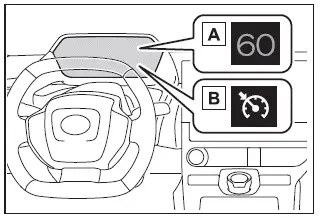
- Set vehicle speed
- Cruise control indicator
■ Switches
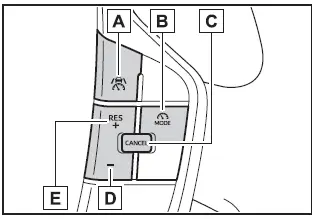
- Driving assist switch
- Driving assist mode select switch
- Cancel switch
- "-" switch
- "+" switch/"RES" switch
Using the cruise control
■ Setting the vehicle speed
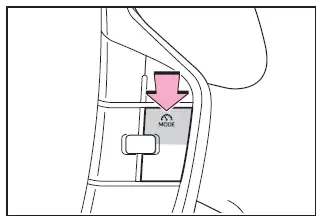
1. In the Subaru Solterra, press the driving assist mode select switch to activate cruise control mode.
The cruise control indicator will illuminate, confirming that the system is ready.
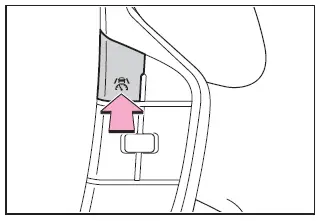
2. Accelerate the Subaru Solterra using the accelerator pedal to the desired speed (approximately 20 mph [30 km/h] or higher), then press the driving assist switch to set the speed.
The speed at the moment the switch is released will be stored as the set cruising speed.
■ Adjusting the set vehicle speed
- Adjusting the set vehicle speed using the switches
To adjust the set speed in the Subaru Solterra, press the "+" or "-" switch until the desired speed appears on the display.
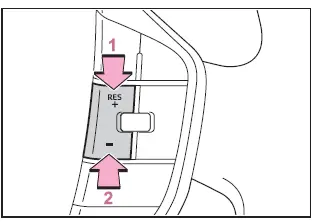
- Increase set vehicle speed
- Decrease set vehicle speed
The Subaru Solterra speed can be adjusted as follows:
Fine adjustment: Increments of 1 mph (1.6 km/h) or 1 km/h (0.6 mph) per press
Continuous adjustment: Speed changes progressively while the switch is held down
- Increasing the set vehicle speed using the accelerator pedal
1. Press the accelerator pedal to increase speed.
2. Press the "+" switch to store the new speed in the Subaru Solterra system.
■ Canceling/resuming control
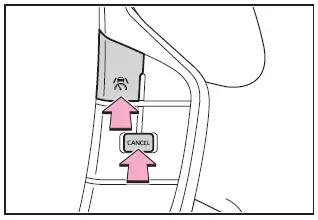
1. Press the cancel switch or driving assist switch to deactivate cruise control in the Subaru Solterra.
The system will also cancel automatically if the brake pedal is pressed.
2. Press the "RES" switch to restore the previously set speed and resume cruise control operation.
■ Automatic cancelation of the cruise control
The Subaru Solterra cruise control system will automatically deactivate in the following situations:
- When vehicle speed drops approximately 10 mph (16 km/h) or more below the set speed
- When vehicle speed falls below approximately 20 mph (30 km/h)
- When other driver assistance systems intervene (such as PCS or drive-start control)
- When the parking brake is engaged
- When system limitations prevent proper operation
Display and system operation state
The Subaru Solterra provides clear visual indicators showing the current cruise control status and operation mode, helping the driver stay informed at all times.
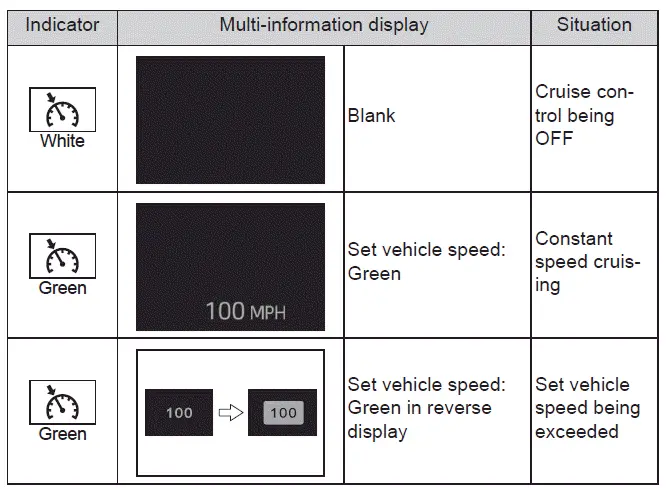
The Subaru Solterra cruise control system enhances long-distance driving comfort while maintaining simplicity and driver control, making highway travel smoother and more efficient.