
This section explains the functionality, proper handling procedures, and safety considerations for the AC charging cable used with the Subaru Solterra, ensuring efficient and secure charging in everyday use.
WARNING
■ When using the AC charging cable and CCID (Charging Circuit Interrupting Device)
Always follow the precautions listed below when operating the AC charging cable with your Subaru Solterra.
Failure to comply with these safety guidelines may result in unexpected accidents, potentially causing serious injury or even loss of life.
- Never attempt to disassemble, repair, or modify the AC charging cable, charging connector, plug, or CCID (Charging Circuit Interrupting Device) of the Subaru Solterra. If any malfunction or abnormality is detected, immediately stop charging and consult an authorized SUBARU dealer.
- Avoid subjecting the AC charging cable or its components to strong impacts or mechanical stress.
- Do not apply excessive force by bending, twisting, pulling, or dragging the AC charging cable, as this may damage internal wiring.
- Prevent contact with sharp objects that could cut or damage the cable insulation.
- Do not fold the charging connector or plug, and never insert foreign objects into them.
- Keep the charging connector and plug away from water or moisture to avoid electrical hazards.
- Do not expose the AC charging cable to high temperatures or place it near heating equipment.
- Avoid placing strain on the cable by wrapping it tightly around the CCID or charging connector.
- Do not use or leave the AC charging cable in situations where the outlet or plug is under mechanical load, such as when the CCID is suspended in the air without support.
NOTICE
■ Precautions when handling AC charging cable
Observe the following handling precautions to prevent damage to the AC charging cable and charging inlet of your Subaru Solterra.
- Insert the charging connector straight and securely into the AC charging inlet.
- After connection, avoid twisting or applying excessive force to the
connector.
Do not lean on the connector or suspend objects from it, as this may affect the connection integrity.
- Ensure the cable is positioned safely to prevent stepping on it or tripping hazards.
- Before disconnecting, confirm that the charging connector is properly unlocked.
- After use, store the AC charging cable in its designated location to protect it from environmental damage.
- Always reinstall the AC charging inlet cap securely after disconnecting the cable.
■ Precautions for low temperatures
In cold environments, the AC charging cable and plug-cord of the Subaru Solterra may become stiff or less flexible. Avoid applying force under such conditions, as this may cause cracks or internal damage. Allow the cable to warm slightly before handling if necessary.
The names of each part of the AC charging cable
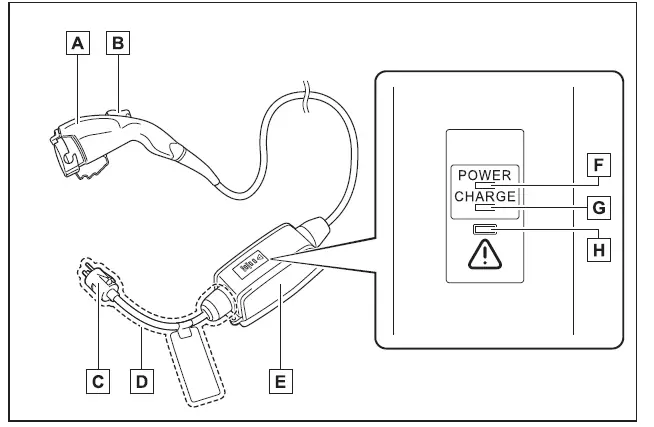
- Charging connector
- Latch release button
- Plug
- Plug-cord
- CCID (Charging Circuit Interrupting Device)
- Power indicator
- Charging indicator (CCID)
- Error warning indicator
Safety functions
The CCID integrated into the Subaru Solterra AC charging cable is equipped with multiple safety features designed to protect both the user and the vehicle during charging operations.
■ Electrical leakage detection function
If an electrical leakage is detected while charging the Subaru Solterra, the CCID will automatically cut off the power supply to prevent potential hazards such as electric shock or fire.
If this protection mechanism is activated, the error warning indicator will flash to notify the user of the issue.
■ Automatic check function
The CCID system in the Subaru Solterra continuously performs self-diagnostics to ensure safe operation. Before charging begins, it verifies that all electrical conditions are within safe limits, providing an additional layer of protection for both the vehicle and the charging infrastructure.
By following these guidelines and understanding the built-in safety mechanisms, Subaru Solterra owners can ensure safe, efficient, and reliable charging in all conditions.
This function performs an automatic system diagnostic before charging begins in the Subaru Solterra, ensuring that the electrical leakage detection system is operating correctly and safely prior to supplying power to the vehicle.
If any irregularity or malfunction is detected during this pre-check process, the Subaru Solterra will notify the user by activating the error warning indicator, which will flash to signal that charging cannot proceed safely.
■ Temperature detection function
The AC charging system of the Subaru Solterra is equipped with a built-in temperature monitoring function integrated into the plug.
During charging, if abnormal heat is detected—such as from a loose connection at the outlet—this intelligent system automatically adjusts and reduces the charging current to suppress excessive heat buildup, thereby improving safety and preventing potential hazards.
■ Conditions for supplying current to the vehicle
The CCID (Charging Circuit Interrupting Device) in the Subaru Solterra is designed with safety in mind and prevents electrical current from flowing to the charging connector unless it is properly connected to the vehicle.
This ensures that even if the plug is inserted into a power outlet, no electricity will be supplied unless a secure connection to the Subaru Solterra is established.
CCID (Charging Circuit Interrupting Device) indicators
■ Indicator operation
The Subaru Solterra charging system uses three distinct indicators to clearly communicate charging and system status to the user.
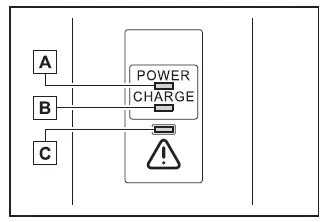
- Power indicator
Illuminates when electrical power is being supplied to the CCID (Charging Circuit Interrupting Device). - Charging indicator
Lights up when the Subaru Solterra is actively charging. - Error warning indicator
Flashes when electrical leakage is detected or when a malfunction occurs within the CCID system.
■ When a malfunction occurs during charging
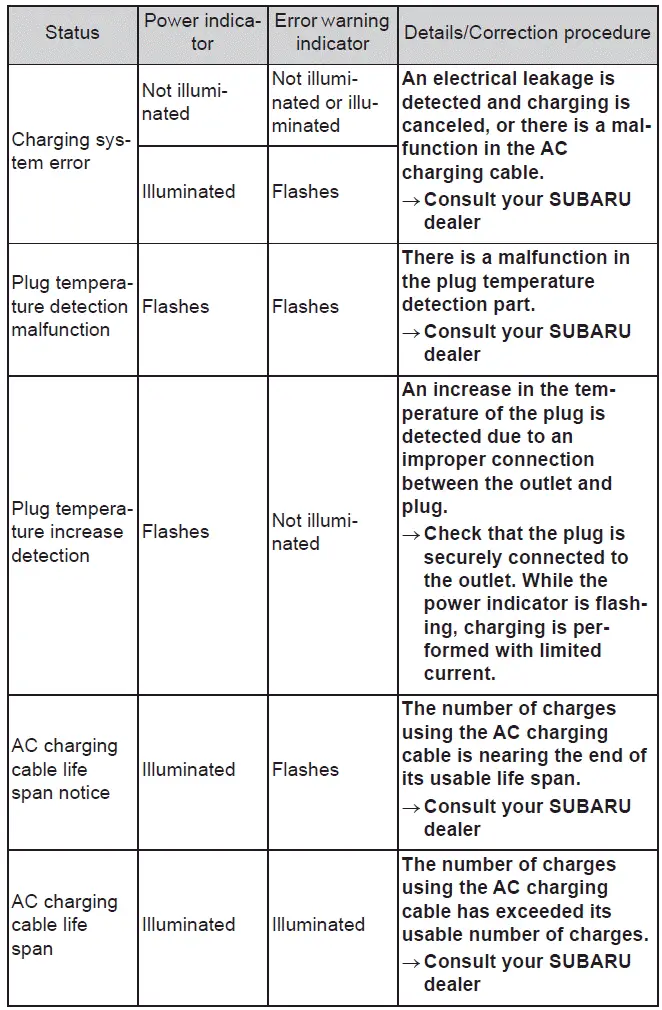
The CCID indicators on the Subaru Solterra communicate system conditions through combinations of states, including off, steady illumination, or flashing patterns, allowing the user to quickly identify any issues.
If the error warning indicator illuminates or flashes, disconnect the plug from the outlet and reconnect it to determine whether the issue resolves.
If the error indicator turns off, normal charging can resume safely.
If the indicator continues to remain active, follow the recommended troubleshooting procedures outlined in the reference chart.
Inspecting the AC charging cable
For continued safe operation of the Subaru Solterra, it is important to regularly inspect the AC charging cable and associated components.
WARNING
■ Routine inspection
Perform the following checks periodically to ensure the safety and reliability of the Subaru Solterra charging system.
Neglecting these inspections may lead to unexpected malfunctions or hazardous situations.
- Ensure that the AC charging cable, plug, charging connector, and CCID (Charging Circuit Interrupting Device) show no signs of damage or wear.
- Confirm that the power outlet is in good condition and free from defects.
- Verify that the plug can be securely and firmly inserted into the outlet.
- Check that the plug does not become excessively hot during operation.
- Inspect the plug tip to ensure it has not been bent or deformed.
- Make sure the plug and connector are clean and free from dust or debris.
Always disconnect the plug from the outlet before performing any inspection. If any irregularities are detected, discontinue use immediately and contact an authorized SUBARU dealer for assistance.
■ Maintaining the AC charging cable
To keep the Subaru Solterra charging equipment in good condition, clean the AC charging cable carefully using a slightly damp, well-wrung cloth to remove dirt, followed by a dry cloth to remove any remaining moisture.
Never wash the charging cable with water directly. Exposure to water can lead to serious hazards such as electrical shock or fire during charging.
■ When not using the AC charging cable for a long time
When the Subaru Solterra is not being charged for an extended period, always unplug the charging cable from the outlet.
Accumulated dust or contaminants on the plug or inside the outlet can lead to overheating, which may result in fire hazards.
Store the AC charging cable in a clean, dry location to protect it from moisture and environmental damage.
By following these practices, Subaru Solterra owners can ensure safe, efficient, and long-term reliability of the charging system while minimizing potential risks.